Mixed Reality Feature Tool (Deprecated)
| Software | Version | Notes |
|---|---|---|
| Mixed Reality Feature Tool for Unity | Used to acquire MR packages |
Older versions of MRTK3 can be found on the Mixed Reality Feature Tool for Unity. The feed that backs the tool and the publishing infrastructure around it have been decommissioned, and new versions will not be published here.
Import required dependencies and MRTK3 packages with Mixed Reality Feature Tool
There are a handful of packages that MRTK3 uses that aren’t part of this toolkit. To obtain these packages, use the Mixed Reality Feature Tool and select the latest versions of the following in the Discover Features step.
To run on HoloLens 2 or to visualize controller models on a Quest device, an additional package is required:
- Platform Support → Mixed Reality OpenXR Plugin
To spatialize audio in your scene, an additional package is required:
- Spatial Audio → Microsoft Spatializer (Optional)
For MRTK3 packages, we recommend the following two packages to help you get started quickly:
- MRTK3 → MRTK Input (Required for this setup)
- MRTK3 → MRTK UX Components
These two packages, along with their dependencies (automatically added by the Feature Tool), will enable you to explore most of our UX offerings and create projects ready to be deployed to various XR devices. You can always come back to the Feature Tool and add more packages to your project later.
Be sure to select the org.mixedrealitytoolkit.* packages, and not the deprecated packages. The com.microsoft.mrtk.* packages have been deprecated and are no longer supported.
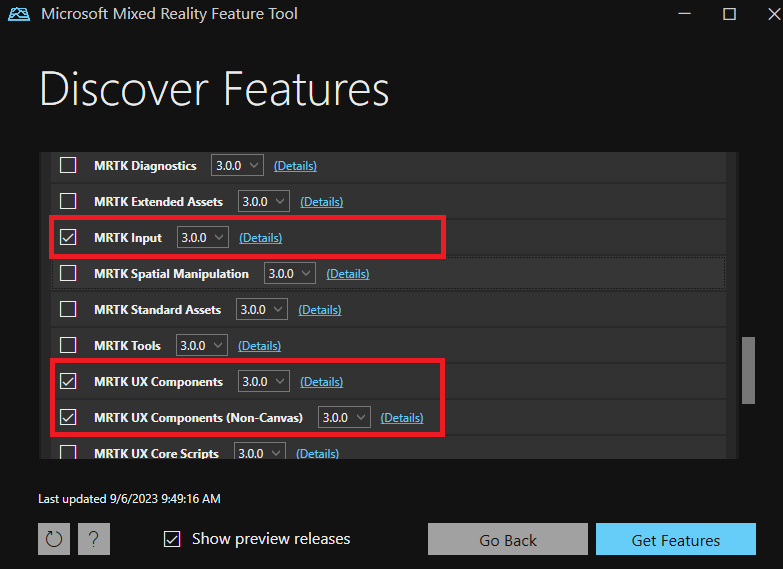
For more information on MRTK3 packages, see the package overview page.
When you’re finished selecting packages, click Get Features, and then follow the instructions in the Mixed Reality Feature Tool to import the selected packages into your Unity project.